



In the ever - evolving field of modern dentistry, intraoral scanners have emerged as a revolutionary tool, transforming the way dental professionals capture digital impressions. A common question that frequently arises among dental practitioners and clinic administrators is whether intraoral scanners require a dedicated computer for operation. As a long - standing supplier of Intraoral Scanners, I'm here to explore this topic in detail and provide you with comprehensive insights.
The Basics of Intraoral Scanners
Intraoral scanners are designed to create highly accurate 3D digital models of a patient's teeth, gums, and oral cavity. These scanners use advanced optical or laser - based technology to capture multiple images, which are then processed to generate a detailed and precise virtual representation. The resulting digital impressions can be used for a variety of dental applications, such as crown and bridge design, orthodontic treatment planning, and implant placement.
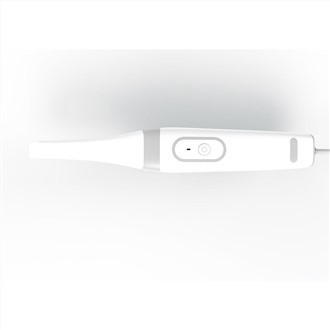
In essence, an intraoral scanner consists of two main components: the scanning wand (the handheld device used to capture images in the patient's mouth) and the software that processes these images. This software requires a computing device to run, and this is where the question of a dedicated computer comes into play.
The Case for a Dedicated Computer
Ensuring Compatibility
One of the primary reasons to use a dedicated computer for an intraoral scanner is compatibility. Every intraoral scanner is designed to work optimally with specific hardware and software configurations. Using a dedicated computer allows us to pre - configure the system to meet these requirements precisely. For example, the software may need a particular graphics card to handle the high - resolution 3D image processing efficiently.
Since we, as an Intraoral Scanners supplier, have in - depth knowledge of our products' technical specifications, we can provide a dedicated computer that is fully optimized for seamless integration with the scanner. This minimizes the risk of compatibility issues that could lead to system errors, slow performance, or inaccurate image generation.
Enhanced Security
In the dental industry, patient data is highly sensitive. A dedicated computer can be better protected in terms of security. It can be isolated from other networks and devices in the clinic to reduce the risk of data breaches. We can install and configure state - of - the - art security software on the dedicated computer, including firewalls, antivirus programs, and data encryption tools. This ensures that patient information captured by the intraoral scanner, such as dental images and personal details, remains confidential and secure.
Improved Performance
Running an intraoral scanner software demands a significant amount of computing power. The software needs to process large datasets quickly to generate real - time 3D models. A dedicated computer can be customized with high - end processors, sufficient RAM, and fast storage devices to handle these demanding tasks. Unlike a shared computer that may be running multiple applications simultaneously, a dedicated computer can focus solely on the scanner software, providing smoother and more efficient operation.
For instance, when a dental technician is using the scanner to capture an impression of a patient's full arch, a dedicated computer can ensure that the software generates a high - quality, detailed 3D model without any lag or processing delays. This not only improves the overall user experience but also enhances the accuracy of the dental treatment planning process.
The Alternative: Using a Shared Computer
Cost - Efficiency
One of the main arguments against using a dedicated computer is cost. For smaller dental clinics or practices on a tight budget, purchasing an additional computer specifically for the intraoral scanner can be a significant financial burden. Using a shared computer that is already available in the clinic can be a more cost - effective solution.
The clinic can allocate the existing computer's resources to run the scanner software as needed. However, it's important to note that this approach may come with certain trade - offs in terms of performance and compatibility.
Flexibility
In some cases, using a shared computer can provide more flexibility. Dental staff may need to access other software applications or perform administrative tasks on the same computer. For example, they may need to use the computer to manage patient records, schedule appointments, or send out billing information. By using a shared computer, the staff can easily switch between different tasks without having to move between multiple devices.
However, this flexibility also comes at a cost. The scanner software may compete for resources with other applications, potentially leading to slower performance and reduced efficiency.
Practical Considerations for Both Options
Regardless of whether you choose a dedicated or shared computer, there are some practical considerations to keep in mind:
Training
Both the scanner and the software require proper training for the dental staff to use them effectively. If you opt for a dedicated computer, the training can be more focused on the specific configuration and operation of the scanner - computer system. On the other hand, if you choose a shared computer, the training should also cover how to manage the scanner software alongside other applications.
Maintenance
Regular maintenance is essential for ensuring the long - term performance of both the intraoral scanner and the computer. If you have a dedicated computer, it's easier to establish a maintenance schedule and perform system updates without disrupting other clinic operations. With a shared computer, maintenance needs to be carefully coordinated to avoid affecting the functionality of other applications.


Future Upgrades
As technology advances, the intraoral scanner and its software may require upgrades to support new features and improve performance. A dedicated computer can be more easily upgraded to meet these requirements. In contrast, upgrading a shared computer may be more complex, as it may affect other applications running on the system.
Conclusion
In conclusion, while it is not absolutely necessary for an intraoral scanner to have a dedicated computer for operation, there are clear advantages to doing so. A dedicated computer offers better compatibility, enhanced security, and improved performance, which are crucial for accurate and efficient dental treatment. However, for clinics with limited budgets or specific operational needs, using a shared computer can be a viable alternative, provided that the potential trade - offs are carefully considered.
If you are interested in learning more about Intraoral Dental 3D Scanners and how they can be integrated with your existing or new computer systems, we'd love to have a conversation with you. Our team of experts is ready to provide you with personalized advice, product demonstrations, and pricing information to help you make an informed decision for your dental practice. Don't hesitate to reach out to us for procurement discussions.
References
- Dental Digital Imaging Association. (Year). Best Practices for Intraoral Scanners.
- Smith, J. (Year). The Impact of Computing Systems on Intraoral Scanner Performance. Journal of Dental Technology.